Everyday Mac Tools
Say hi

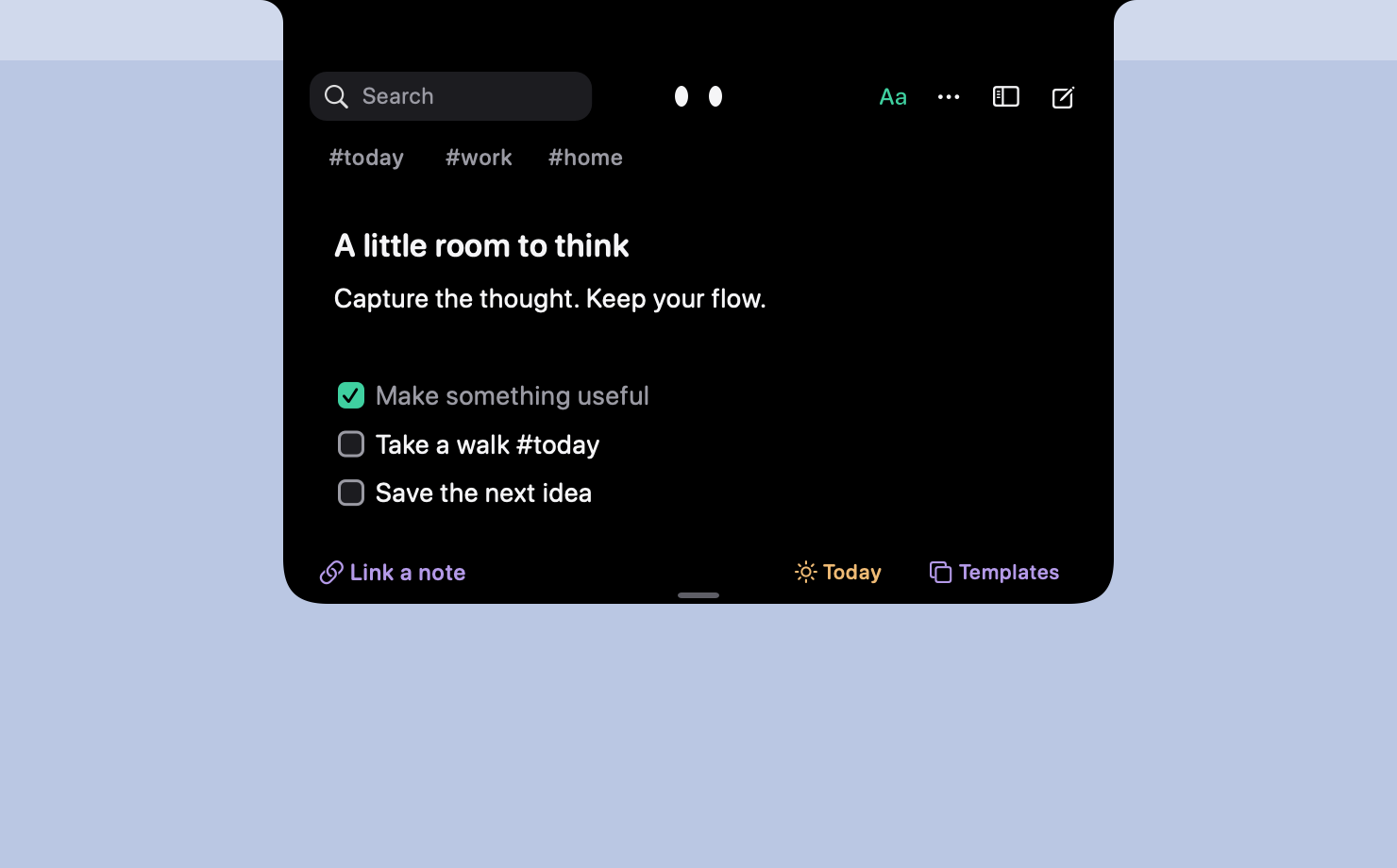
New: Inkling. A little room to think, in your notch.Meet Inkling ↗

We make toolsfor the Mac,made with care.

Eleven small apps for people who get their work done on a Mac. Each one does a single job completely, opens instantly, and minds its own business. Most you pay for once and keep.

Signed and notarized by AppleFree to try, every oneNo trackers on this site

The tools

Eleven tools. One job each.

Every tool lives on its own site, where you can try it before you decide. Scroll through them here, or pick one from the Dock.

01/ 11

Dictation

Voice Keyboard Pro

Your keyboard was the bottleneck.

For anyone who talks faster than they type.

  • Hold, speak, let go. Words land at your cursor in any app: Mail, Slack, VS Code, Terminal. Punctuation and all.
  • Your words, your way. Personal vocabulary, snippets, and an optional rewrite that tidies as you go.
  • Mac and iPhone. The same keyboard on both, on one plan.
macOS 14 or laterFree tier, foreverAudio never stored
Visit voicekeyboardpro.com
02/ 11

PDF redaction

Basalt

Redacted means gone.

For lawyers, HR, finance, and anyone who sends documents out of the building.

  • Truly removed. It removes the text underneath, not a black box drawn over it.
  • It proves it. Every export is re-opened, checked and signed with a certificate, or no file is written.
  • Eighteen tools, one window. Merge, split, OCR, Bates numbers, signatures, compare, clean-up.
macOS 13 or laterEvery tool free for 24 hours3 Macs
Visit basaltformac.com

03/ 11

File repair

Manatee

Drop in something broken. Get back something that works.

For the file someone sent you at 11 pm that won’t open.

  • Repair. Rescue a corrupt video, PDF or Word document.
  • Convert and shrink. HEIC, MKV, an old .doc: make it open anywhere, and fit under WhatsApp’s or Slack’s limit.
  • Clean. Strip GPS, EXIF and document metadata before you share.
macOS 12 or laterFree for 24 hoursOriginals never modified
See Manatee

04/ 11

Hidden settings

Mainspring

Make your Mac unmistakably yours.

For people who have opinions about their Dock.

  • Ninety-odd power-ups. The settings macOS hides, each one a switch.
  • Recipes and Scenes. Apply a whole setup in one click; switch it on a trigger.
  • Snapshotted first. Every change unwinds. One click, no Terminal.
macOS 13 or laterOne full day free3 Macs
Visit trymainspring.com

05/ 11

Disk cleanup

Crumb

Your Mac’s storage, finally explained.

For the moment the Mac says “Your disk is almost full.”

  • The whole-Mac audit. Finally see what “System Data” actually is.
  • Ask before you delete. Plain-English answers about what’s safe to remove, and why.
  • Uninstall properly. The app, and everything it left behind.
macOS 12 or laterFree audit and one cleanup2 Macs
Visit cleanwithcrumb.com

06/ 11

Workday receipt

Punchcard

Clock out. Take the receipt.

For freelancers, and anyone who wants to see where the day went.

  • It notices. Your day, from the menu bar. App names and nothing else.
  • It prints. A receipt at closing time. Tear it off, post it.
  • It keeps your day to itself. Your tracked time never leaves the Mac.
macOS 13 or laterFirst two receipts free2 Macs
See Punchcard

07/ 11

Notch shelf

Ledge

Throw a file at the notch. It lands exactly where it belongs.

For the drag across four windows that always finds the wrong one.

  • Catch anything. Drag a file, folder, image or link up to the notch and let go; Ledge holds it on a shelf.
  • Hand it off, reshaped. Drop it on a terminal and it becomes the path, on Slack the upload, on Finder the file.
  • Always a throw away. Open the shelf with ⌥ Space or a click on the notch.
macOS 14 or laterFree for 14 daysNothing leaves your Mac
See Ledge

08/ 11

File privacy

Hushbox

Right-click a file. It locks where it sits.

For the files that should stay out of Spotlight and Recents.

  • Lock from the right-click menu. Choose Lock with Hushbox on any file or folder. It stays exactly where it is.
  • Out of Spotlight and Recents. What’s inside disappears until you unlock it with Touch ID.
  • AES-256, fully local. Every locked item is an encrypted disk image made with Apple’s own tools.
macOS 13 or laterFree for 24 hours2 Macs
See Hushbox

09/ 11

Screen privacyNew

Shoji

Press ⌘L. Your screen slides shut.

For anyone whose screen is seen by more people than they would like.

  • Lock in a keystroke. Every display is covered at once, and Touch ID opens it with every window exactly where you left it.
  • Blur just what matters. One app, your chats, or everything but the window you are using.
  • No permissions. It never records or reads your screen, and nothing leaves your Mac.
macOS 14 or laterFree for 24 hours3 Macs
See Shoji

10/ 11

Notch notesNew

Inkling

A little room to think.

For the thought you almost lost while doing something else.

  • ✓Right in your notch. Hover or press Option–N, jot it down, and tuck it away with Command–Return.
  • ✓Room for the whole idea. Checklists, tables, templates, tags, and linked notes, all close at hand.
  • ✓A little company. Meet Ink, a curious pair of eyes. Lively, Calm, or Still: you choose.
macOS 14 or later24 hours free$12 once · 3 Macs
Meet Inkling

11/ 11

Trackpad gesturesNew

Trill

Your trackpad can do more.

For anyone who wanted more from their trackpad and found BetterTouchTool too much.

  • Sets, ready to switch on. Everyday, Browser, Windows, Media, Writing and Developer. Or record a gesture by doing it.
  • A Hyper Key. Caps Lock becomes a fifth key for your own shortcuts, with a cheat sheet while you hold it.
  • Felt, not guessed. A tick under your finger for every gesture, on a Force Touch trackpad.
macOS 14 or laterFree for 24 hours3 Macs
See Trill

House rules

How every tool on this street is made.

Five rules, applied to every tool we ship. Where a tool is the exception, it says so on its own site, and we say so here.

  1. 01

    Made for the Mac.

    Light downloads, instant launches, a home in the menu bar where it makes sense, and the Mac’s own conventions throughout: drag and drop, Services, the lot.

  2. 02

    Pay once, keep it.

    Priced like hardware: one payment, free updates, a couple of Macs per licence. Voice Keyboard Pro is the exception. It runs a transcription service, so it charges monthly, and has a free tier that never expires.

  3. 03

    They mind their own business.

    No accounts to make, no telemetry, no crash pings. Network use is explained on each product’s privacy page. Inkling keeps notes local, checks licences and updates online, and fetches a web page’s title when you capture a URL. (Voice Keyboard Pro sends audio out to be transcribed and discards it; switch on Offline Mode and it stays home.)

  4. 04

    Try before you buy.

    Every tool has a free way in: a free tier, a day’s trial of the whole app, or the first two receipts on the house. No card, no email wall.

  5. 05

    One job. No bloat.

    Each tool does one job and does it completely. When a tool starts wanting tabs and a sidebar for something new, that’s a new tool, not a bigger one.

Help

A person reads every email.

No ticket portal, no chatbot. Write to us and you’ll hear back from whoever built the tool.

hey@everydaymactools.com
Do I need an account for any of these?

No. The pay-once tools activate with a licence key that arrives by email, and never ask you to sign in to anything. Voice Keyboard Pro’s paid plan is tied to your email so it can follow you between Mac and iPhone; its free tier needs nothing.

Why aren’t they on the Mac App Store?

Because several of them couldn’t be: the App Store sandbox forbids what Mainspring and Crumb do. So every tool is sold on its own site, signed with our Developer ID and notarized by Apple, and macOS opens it without complaint. (Voice Keyboard Pro’s iPhone half is on the App Store, as it has to be.)

Will they run on my Mac?

If it runs macOS 12 Monterey you can run Manatee and Crumb; Ventura gets you Basalt, Mainspring, Punchcard and Hushbox; Voice Keyboard Pro, Ledge, Shoji and Trill want Sonoma. Each tool above lists what it needs, and its own site gives the download size.

How do updates work, and what do they cost?

They’re free. Each app checks its own site for new versions and offers them to you in-app; nothing is pushed, and nothing about you is sent to ask.

Can I use one licence on more than one Mac?

Yes. Two Macs for Crumb, Punchcard and Hushbox; three for Basalt, Mainspring, Shoji and Trill. The key is the same; paste it in on the next machine. Lost it? Email us from the address you bought with.

Why separate apps rather than one big suite?

Because you don’t want a PDF redactor living inside your disk cleaner. Each tool does one job, stays sharp, launches instantly, and can be tried on its own. When a tool starts wanting tabs and a sidebar for something new, that’s a new tool, and we go and build it.

The shop

A studio that builds the tools it wanted, and keeps building.

Everyday Mac Tools is the house label of Caretopia Network Private Limited: a team of twenty building Mac apps that each do one job properly. Each tool starts as an itch on our own Macs: a contract that needed real redaction, a file that wouldn’t open, a disk that filled up again. We build the fix, give it a name and an icon, and put it on its own site. Then we start the next one. That’s the whole business model.

Support is a person reading email. Bugs get fixed. Feature ideas get argued with, and sometimes built.