 Ledge
LedgeThrow a file at the notch.
It lands exactly where it belongs.
Ledge turns the notch into a shelf. Drag anything up to it, let go, and hand it off to any app or folder, as the right kind of thing.
$19 once · free 14-day trial · universal & notarized by Apple · macOS 14+
Drag up. Let go. Caught.
Files pile up on the desktop, in Downloads, in a dozen tabs. Ledge gives them one place to land: the notch, already at the top of every screen, right where your cursor drifts. Toss a file up and the shelf reaches out and catches it.
Aim at the notch
Start dragging any file and the shelf slides down to meet it. No target to find, no window to summon.
It holds everything
Screenshots, PDFs, folders, whole app bundles, images, even links and text. They rest on the shelf until you're ready.
Read at a glance
Every tile shows a real preview, a clean name, and a type badge, so a spreadsheet, a PDF and a photo never look alike.
The same file, the right shape everywhere.
Drop a screenshot on a terminal and you don't want a file, you want its path. Drop it on Slack and you want the upload. Ledge rewrites the hand-off in flight, so each destination gets exactly the representation it expects.
dragged to the shelf
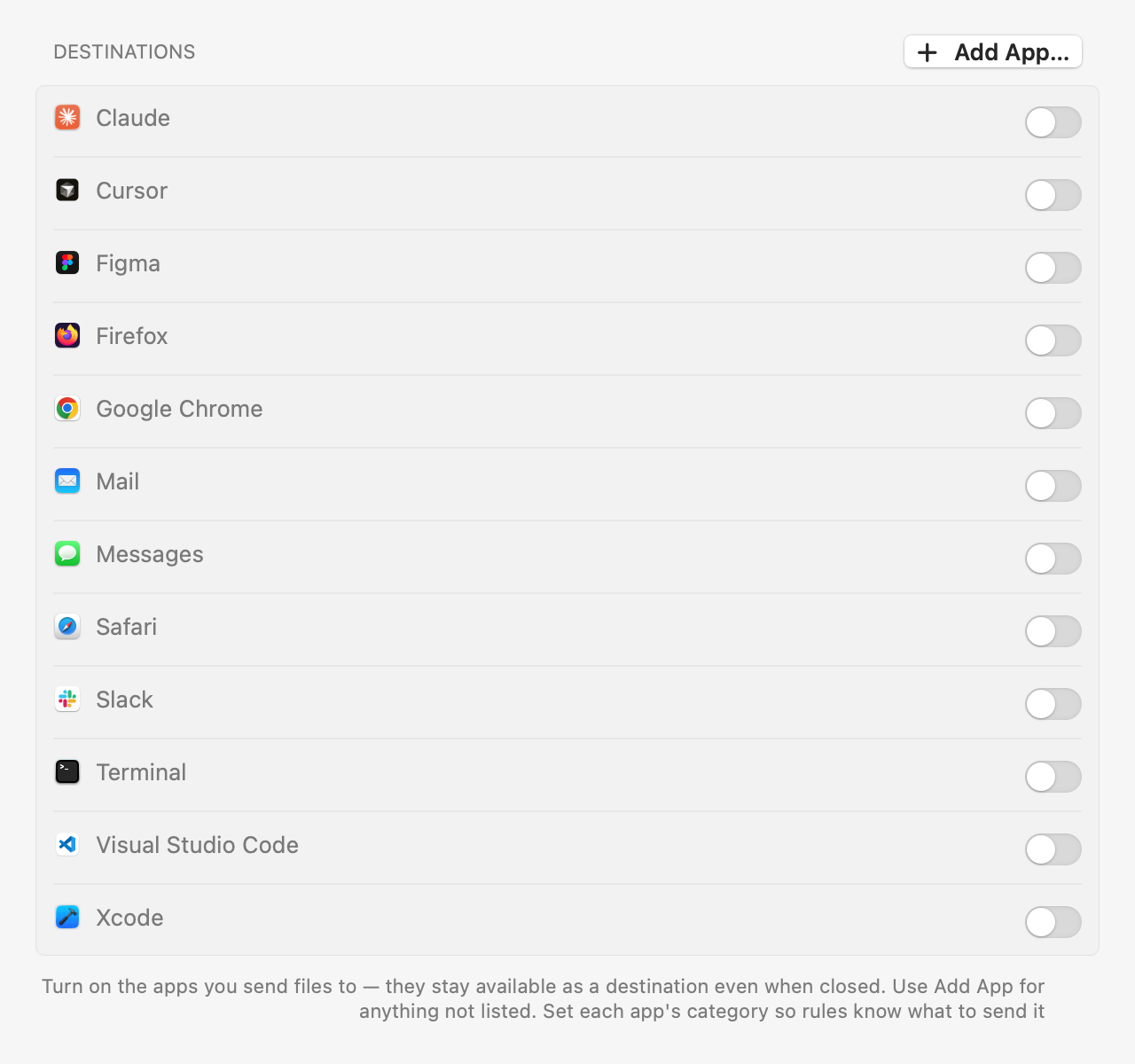
Turn on the apps you actually send to.
- ✓Flip a switch for the apps you route to (Chrome, Slack, Terminal, VS Code) and they're always on the shelf, even when closed.
- ✓Fold in folders so a drop lands in the right place with the right name.
- ✓Rules per app decide the format, so a design tool gets a PNG and a terminal gets a path, automatically.
Open it however your hands are already moving.
⌥ Space
One shortcut opens the shelf and puts it away. No permission to grant. It just works.
Click the notch
Tap the cutout itself (there's nothing behind it) and the shelf drops down.
Stays out of the way
Done with it and it settles into a hairline under the notch. It never traps a click below.
It works for you, and only you.
Ledge is a tool, not a service. There is no account, no cloud, and no way for it to reach the network. The release is blocked from shipping if the binary so much as links a networking symbol.
Never phones home
Your files never leave your Mac. A build gate greps the binary and fails if it finds a way out.
Notarized by Apple
Signed with a Developer ID and notarized, so it opens with no scary warnings, ever.
Universal & tiny
Apple silicon and Intel in one build, a few megabytes on disk, and every update included.
Pay once. It's yours.
- ✓ Free 14-day trial, no card to start
- ✓ A licence you own, not a subscription
- ✓ 30-day refund, for any reason
- ✓ Notarized, universal, macOS 14+
Try it free for 14 days. Buy whenever you're ready.
Good to know.
Do I need a Mac with a notch?
A notch is where Ledge feels most at home. You literally throw files at it. On a Mac without a notch the shelf still works: it lives in the same spot at the top-centre of the screen and opens with ⌥ Space or the menu-bar icon.
How do I install it?
Open the installer and click through. Ledge lands in your Applications folder and shows up in the menu bar right away. It's signed with a Developer ID and notarized by Apple, so it opens with no warnings, no right-clicking, and no Terminal. It uses just a few megabytes.
Does it connect to the internet?
No. The release build runs a gate that inspects the compiled binary for networking symbols and refuses to ship if it finds any. The app you download physically cannot phone home. Your files never leave your Mac.
Does it run on Intel Macs?
Yes. Ledge ships as a universal binary with both Apple silicon and Intel slices, and needs macOS 14 Sonoma or later.
Is it a subscription?
No. It's $19 once, with a free 14-day trial and every update included. You own the licence.
Can I get a refund?
Within 30 days, for any reason or none. Email us and it's done. No form, no exit survey.
Give the notch a job.
Drag a file up. Watch it land where it belongs.
$19 once · free trial · macOS 14 Sonoma or later