Out of Spotlight, Recents and previews
What is inside a locked item stays out of all three until you unlock it. Even then, it opens somewhere Spotlight never looks.
Right-click any file or folder and choose Lock with Hushbox. It stays in its folder, locked. What is inside disappears from Spotlight, Recents and previews until you unlock it with Touch ID.
Free for 24 hours, then $9 once. Unlocking stays free.
macOS 13 or later, on Apple silicon and Intel.
An animation of a Finder window. The pointer right-clicks a file called Taxes 2025.pdf and chooses Lock with Hushbox. After a check, the file becomes a locked item with the Hushbox lock icon, named Taxes 2025. A double-click and Touch ID open it again.
There is no vault to open and nothing to drag into a window. Your files stay where you keep them, and you lock and unlock them from the right-click menu.
Right-click a file or folder and choose Lock with Hushbox. It becomes a locked item in the same place, with the Hushbox lock icon. Taxes 2025.pdf now shows as Taxes 2025.
The original is deleted only after the locked copy has been checked byte for byte.
Double-click the item, or right-click and choose Unlock. Use Touch ID or your Hushbox password. A folder opens in its own Finder window. A file opens in its app.
It opens in a private encrypted space that Spotlight never indexes. Nothing unencrypted ever sits on your disk.
Choose Lock Now from the menu bar icon or the right-click menu. Or let it happen: Hushbox locks by itself when the screen locks, when the Mac sleeps, or after the idle time you pick.
If an app has unsaved work, Hushbox asks first. It never force-closes it.
Done keeping it private? Remove Lock turns the item back into normal files, with the exact original name.
Every locked item is an AES-256 encrypted disk image, made with Apple's own tools. Hushbox does not invent a file format, so you are never locked in.
Locking is one click. The rest of Hushbox is about the moments around it: a Mac that goes to sleep, an app with unsaved work, a password you change later.
What is inside a locked item stays out of all three until you unlock it. Even then, it opens somewhere Spotlight never looks.
The original is deleted only after the locked copy has been checked byte for byte. Until then, both exist.
Locking never force-closes an app that has unsaved work. Hushbox asks you first, and you decide.
A single Hushbox password opens every locked item. Touch ID saves you typing it each time.
Change your password and Hushbox keeps the older ones, only to open older copies of an item, such as a Time Machine restore.
Remove Lock turns a locked item back into normal files, with the exact name it had before.
Pick how long Hushbox waits once you stop using your Mac. It also locks the moment the screen locks or the Mac goes to sleep.
Auto-Lock
Unlocked items also lock when your screen locks or your Mac sleeps.
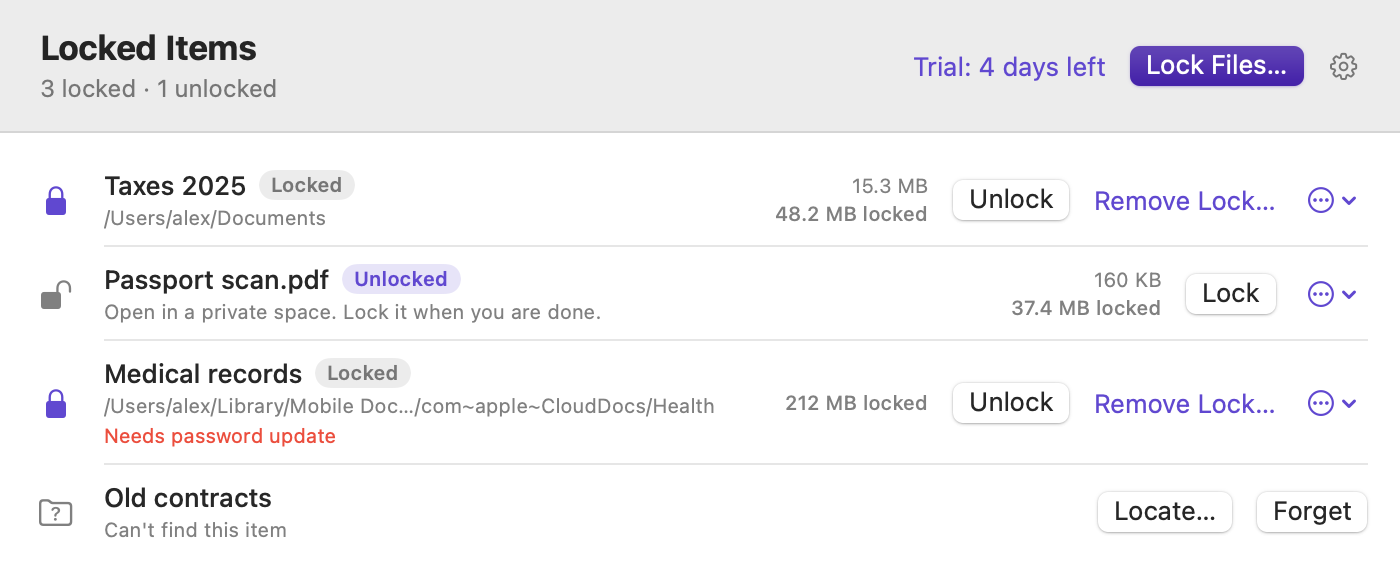
Try everything for 24 hours. After that, $9 buys Hushbox for 2 Macs, with free updates. Even if you never buy, you can always unlock what you locked. Your files are never held hostage.
Checkout is handled by Dodo Payments, our merchant of record. Your license key arrives by email. 7-day refund.
Something else? Read the support page or write to hey@everydaymactools.com.
Double-click it, or right-click it and choose Unlock, then use Touch ID or your Hushbox password. A folder opens in its own Finder window. A file opens in its app.
The contents open in a private encrypted space that Spotlight never indexes, so nothing unencrypted ever sits on your disk.
Yes. A locked item is an AES-256 encrypted disk image, the kind macOS makes itself. Rename it so it ends in .sparsebundle, double-click it, enter your password, and macOS opens it without Hushbox. The support page has the steps.
There is no back door and no password recovery, so keep your Hushbox password somewhere safe, such as a password manager.
Hushbox keeps older passwords only to open older copies of an item, such as Time Machine restores.
No. Everything happens on the Mac. There is no account and no cloud. Hushbox contacts Dodo Payments only to activate or check a license.
Each locked item uses about 33 MB of extra space. If you have lots of small files, put them in a folder and lock the folder, rather than locking each file.
They are not changed. Copies made before locking, in Time Machine or in iCloud's Recently Deleted, stay as they were.
Yes. A locked item keeps its name in Finder, so Taxes 2025.pdf shows as Taxes 2025. What is inside is hidden, not the name. Other apps' Open Recent menus may also remember file names.
Items marked Locked in Finder, system folders, apps, and whole drives.
Unlocking always stays free, even after the trial, so your files are never held hostage. To lock new items after the first 24 hours, buy a license for $9.
macOS 13 or later, on Apple silicon and Intel. One license covers 2 Macs.
No. Hushbox is $9 once, for 2 Macs, and updates are free.